Why AI Agents Love Binaries
Picture a robot that has to build a house. You can hand it a thousand-page manual and a bag of loose parts, or you can hand it one tool that does the job when you press a button. Today's AI agents face the same choice, and more and more often the answer is the second one.
That tool is a binary: a single compiled file you run from the terminal. It looks boring, but it is quietly becoming the favorite way for AI to touch the real world. Game engines, cloud platforms and coding assistants are all converging on the same idea. This post explains why, with real numbers.
What a binary is
A binary is a program that has already been translated into machine code. You do not install a language, fetch libraries or configure anything. You copy one file, run it, and it works.
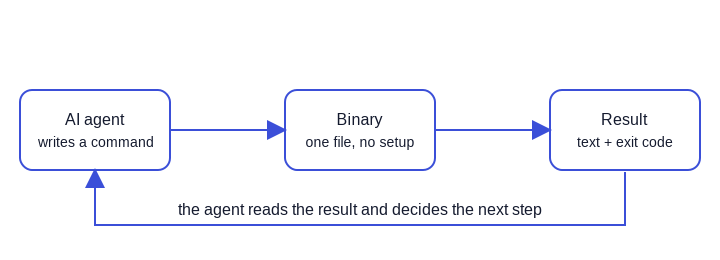
An AI CLI session is a conversation where the model types commands into a terminal and reads what comes back. The loop is simple: the agent writes a command, the binary runs, and the agent reads the output. Then it decides what to do next.
This fits the way language models work. They read and write text, and a terminal is text in and text out. Models have also seen billions of lines of terminal history during training, so commands already feel familiar to them.
Why the exit code matters
Every binary ends with a number. Zero means success and anything else means failure. That single number gives an agent something it rarely gets elsewhere: a clear, honest answer to the question "did that work?"
Without it, an agent has to guess from messy output whether a build passed. With it, the agent can branch immediately. If the number is zero, move on. If it is not, read the error and fix it.
A binary also behaves the same way every time. Same file, same flags, same result. For a model that cannot see your screen, predictable behavior is worth more than clever features.
The context window tax
An AI model can only hold so much text in its head at once. That space is called the context window, and everything the agent knows about its tools has to fit inside it.
One popular way to give agents tools describes each action in a long written schema. Those descriptions are loaded before any real work begins. One widely cited measurement found a single popular tool server spending roughly 55,000 tokens on descriptions alone. The same job done with a plain command and its output cost about 200 tokens.
Cloudflare ran into this at a much larger scale. Its API has over 2,500 endpoints, and describing each one as a separate tool would take about 1.17 million tokens, more than most models can hold at all. Their fix, called Code Mode, gives the agent just two tools: one to search the API description and one to run code against it. The cost drops to about 1,000 tokens, a 99.9 percent reduction.
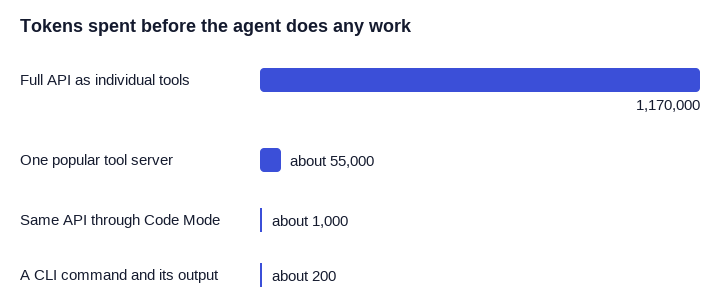
The lesson is the same in both cases. The less an agent has to carry around to use a tool, the more room it has left to think about your problem.
| Approach | Tokens before work starts | Chains with other tools |
|---|---|---|
| Every action as its own tool | Very high | One call at a time |
| Code Mode | About 1,000 | Inside one code block |
| Command line binary | Close to zero | Pipes and scripts |
Godot: a whole engine behind one command
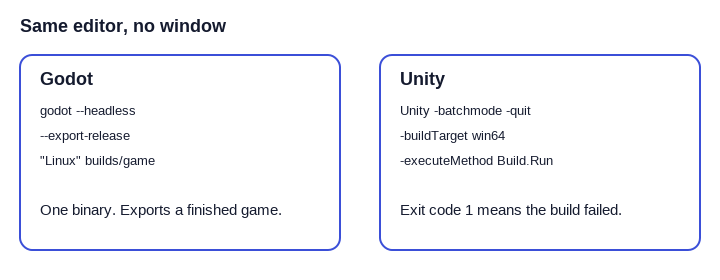
Godot is a game engine, and you would expect it to need a window, a mouse and a person clicking menus. It does not have to. Its editor is a single binary that can run with no display at all.
The headless flag turns off the window. The documentation says it is required on machines without a GPU, such as build servers. From there, one line exports a finished game.
godot --headless --export-release "Linux" builds/game
Another flag runs a standalone script, so an agent can also check a scene, rename assets or generate content without ever opening the editor. The project folder is passed with a path flag, which means the agent can work on several games from one terminal.
Think about what this gives an agent. It can edit a script, export the game, read the result and try again in a tight loop. No screenshots and no clicking are needed.
Unity: the same idea at a larger scale
Unity takes the same approach with different flag names. Running the editor in batch mode removes every popup and dialog, so nothing waits for a human to press OK.
Unity -batchmode -quit -buildTarget win64 -executeMethod Build.Run
Here the flags do the following jobs:
- batchmode runs the editor with no interaction.
- quit closes it when the work is done.
- buildTarget picks the platform, such as Android, iOS, Windows or WebGL.
- executeMethod runs a function from your own project the moment it opens.
- nographics skips the GPU on machines that have none.
When something goes wrong, the process exits with code 1, or your method can set its own code. An agent can use that to know whether a build, a test run or a data import succeeded. This is why game build servers have relied on it for years, and why agents slot into the same pipeline so easily.
Cloudflare: from tools to a CLI built for agents
Cloudflare gives the clearest picture of where this is going. Its command line tool, Wrangler, was built for human developers. Then agents showed up.
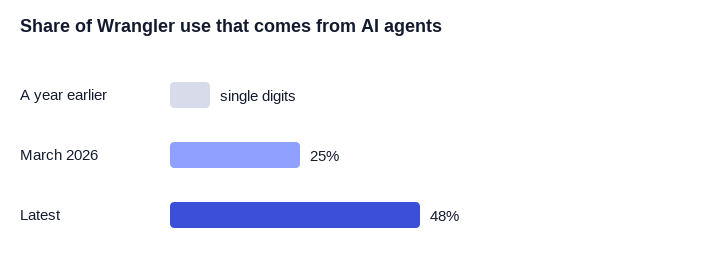
In March 2026 agents were behind about a quarter of all Wrangler use, up from single digits the year before. At the latest count the share had reached 48 percent. Almost half of the use of a developer tool now comes from software.
Cloudflare responded by building a new command line tool called cf, designed for agents first. Its numbers tell the story:
- It covers over 3,000 API operations, compared to about 280 in Wrangler.
- JSON is the default output, condensed for agents and pretty printed for people.
- A search command lets an agent describe what it wants in plain language and find the right operation.
- Configuration is written in typed TypeScript, so mistakes are caught before they cost anything.
With that one tool, an agent can create a worker, deploy it, watch it, protect it and put it behind a firewall. The agent never needs a dashboard.
Why binaries keep winning
Look at Godot, Unity and Cloudflare together and the same reasons appear again and again.
- Small footprint. A command and its output cost a few hundred tokens, not tens of thousands.
- Familiar to models. Terminal commands are everywhere in training data.
- Honest results. Output goes to text and the exit code says pass or fail.
- Composable. Commands chain together with pipes and scripts, and big output can go to a file instead of into the context window.
- Easy to ship. One file runs on a fresh machine or build server with nothing to install.
- Headless by nature. No window means no human is needed in the loop.
The agents themselves follow this pattern. Many of the newest terminal coding agents ship as one static binary, written in Rust or Go. They start almost instantly and carry no runtime to install, because the same advantages that help an agent use a tool also help the tool run.
What this means for you
If you build software that agents might use, a few habits make a big difference.
- Offer a command line interface, even if you already have a graphical app or a web API.
- Make the interface headless, with no prompts that wait for a person.
- Print results as plain text or JSON, and keep error messages specific.
- Return a real exit code, zero for success and non-zero for failure.
- Ship it as a single file with no dependencies.
- Keep command names and flags consistent so a model can guess them.
Our own AI game engine follows this rule. It is a single binary you drive from the command line, because that is the form an agent can use best. Where the engine is going, the model asks and the binary does.
The next time you watch an agent work, look past the chat window and watch the terminal. Most of the real work happens there, and it is done by small, quiet files that do one thing well.
Sources
- blog.cloudflare.com/code-mode-mcp
- blog.cloudflare.com/cloudflare-cf-cli-launch
- docs.godotengine.org/en/stable/tutorials/editor/command_line_tutorial.html
- docs.unity3d.com/Manual/EditorCommandLineArguments.html
- jannikreinhard.com/why-cli-tools-are-beating-mcp-for-ai-agents
- firecrawl.dev/blog/mcp-vs-cli